Workflows crafted by lawyers — walked through step by step
Step-by-step guides and tutorials for every role across six products — ODR, DRR (Dispute Resolution & Recovery), CLM, E-Sign, E-Stamp, and Document Automation AI. Learn how to file disputes, run recoveries, manage contracts, sign electronically, request stamp papers, and raise support tickets on Infinity Resolve.
24/7 Support
We are here for every user role, around the clock.
Mon–Sat, 9 AM–9 PM IST
Available in every dashboard header
Role-based tutorials
Pick your role to see a walkthrough with screenshots and steps.

File a dispute, track it, and reach a settlement — end to end.
- 1
Sign in to the Client Portal
Use the Sign In menu on the top header and choose Client Portal. New here? Register with your email and verify the OTP sent to you.
- 2
Create a new case
On the Overview tab, open "New Case". Enter a title, category (Commercial, Family, Civil, Workplace, Community), and a short description. A unique case number (IRC/…/year) and access key are generated automatically.
- 3
Track your case
The My Cases tab lists every case with its status — Intake, Scheduled, In Session, Resolved, Closed. Use the search bar to filter by title or case number. Click "View details" to open the full case page.
- 4
Join a mediation session
When your mediator schedules a session you get a video conference link. Find it under Sessions or Case Calendar, then click "Join Session" at the scheduled time.
- 5
Upload & review documents
Open the Documents tab, pick your case, and upload notices, agreements, or supporting files. Admins can download; you can delete your own uploads.
- 6
Follow the case timeline
The Case Timeline tab shows every event — case created, status changes, sessions, assignments, and document uploads — as an audit trail.
- 7
Draft a settlement with AI
In Drafting AI powered, choose a document type, parties, and key facts, then generate an editable draft you can copy or download for review with your mediator.
Product tutorials
Step-by-step walkthroughs for each of the five products — with annotated dashboard screenshots and every tab explained.

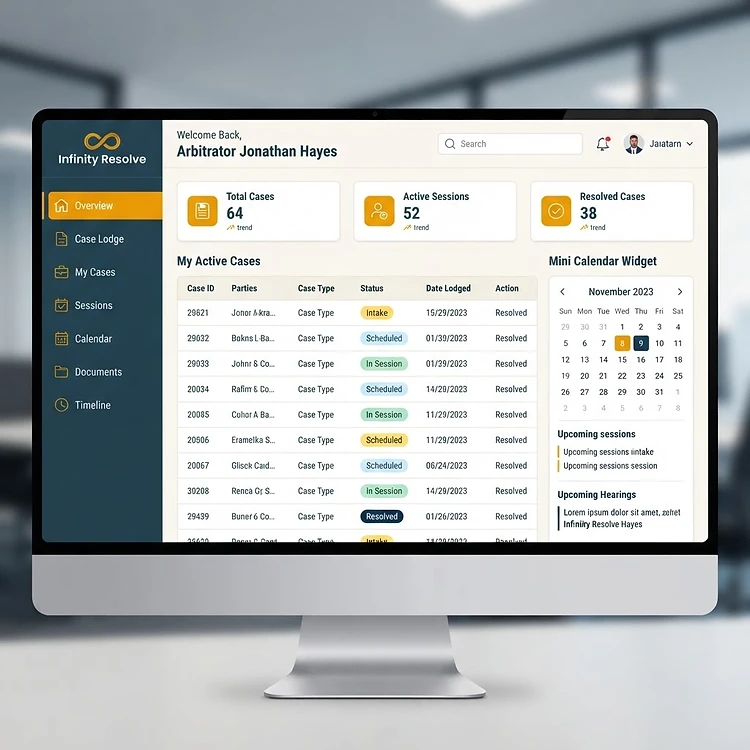
File disputes, track cases, join mediation sessions, and reach settlements — all in one virtual courtroom.
- 1
Open the ODR Dashboard
Sign in and navigate to your role-based dashboard. The Overview tab shows your case statistics, upcoming sessions, and recent activity at a glance.
legaltechex.base44.app/dashboard/clientOverviewDashboard1Step 1: Click Overview in the sidebar to open this tool - 2
Lodge a new case
Click "Case Lodge" to file a dispute. Enter a title, category (Commercial, Family, Civil, Workplace, Community), description, and party details. A unique case number (IRC/…/year) and access key are auto-generated.
legaltechex.base44.app/dashboard/clientCase LodgeDashboard2Step 2: Click Case Lodge in the sidebar to open this tool - 3
Track your cases
The My Cases tab lists every case with status badges — Intake, Scheduled, In Session, Resolved, Closed. Search by title or case number, then click "View details" to open the full case page.
legaltechex.base44.app/dashboard/clientMy CasesDashboard3Step 3: Click My Cases in the sidebar to open this tool - 4
Join mediation sessions
When a mediator schedules a session, a video conference link appears under Sessions. Click "Join Session" at the scheduled time to enter the virtual mediation room.
legaltechex.base44.app/dashboard/clientSessionsDashboard4Step 4: Click Sessions in the sidebar to open this tool - 5
View the case calendar
The Calendar tab displays all scheduled sessions and case creation dates in a monthly grid. Click any date to see the sessions and cases for that day.
legaltechex.base44.app/dashboard/clientCalendarDashboard5Step 5: Click Calendar in the sidebar to open this tool - 6
Upload & review documents
Open Documents, select your case, and upload notices, agreements, or supporting files. Documents are OCR-scanned for text search and highlighting in the document viewer.
legaltechex.base44.app/dashboard/clientDocumentsDashboard6Step 6: Click Documents in the sidebar to open this tool - 7
Follow the case timeline
The Timeline tab shows every event — case created, status changes, sessions, assignments, document uploads — as a complete audit trail.
legaltechex.base44.app/dashboard/clientTimelineDashboard7Step 7: Click Timeline in the sidebar to open this tool - 8
Draft settlements with AI
Use the Drafting tab to generate settlement drafts. Choose a document type, enter parties and key facts, then generate an editable AI draft.
legaltechex.base44.app/dashboard/clientDraftingDashboard8Step 8: Click Drafting in the sidebar to open this tool
PDF signer — how it works
Sign and stamp any PDF in the browser. No installation, no per-document charge — just an OTP-verified signature and a downloadable audit trail.
Upload the PDF
Drop in any PDF — an agreement, a letter, a purchase order. Nothing is published; the file stays private to your account.
Set up the tools
eSign is required: signer details, signature and placement. Optionally add eStamp (upload your own stamp paper PDF or generate a certificate page), run the negotiation bottleneck checker, and record positions in the negotiation studio.
Verify with an OTP
A 6-digit code is emailed to you. On confirmation the signature is impressed on every page — or on the single page you chose — and the stamp ID, state and date print on each page.
Download and audit
Download the executed PDF, plus an audit report carrying timestamps and SHA-256 hashes of the original and signed files. Both are kept in your document records.
Where it fits — and where it does not
Use it for NDAs, vendor and service agreements, purchase orders, HR letters, invoices, statements of work and settlement terms. Do not use it for wills, powers of attorney, trust deeds, conveyances of immovable property, negotiable instruments (other than cheques), or statutory filings such as ITR, MCA, GST and RBI-regulated digital lending contracts — those need wet ink, a DSC token or secure Aadhaar eSign.
Quick how-to guides
Common features every role should know.
Case access keys
Every case gets a unique number (IRC/…/year) and access key. Share the key only with parties who should join the case.
Video Conference sessions
Sessions run in our built-in video conference room. The link is generated when a mediator schedules a session and appears in Sessions and the Case Calendar.
OCR & highlighting
Uploaded documents are OCR-scanned. Open the document viewer to highlight text in multiple colors and add cross-reference notes.
Sending notices
Issue formal mediation notices and respondent invitations directly from a case — every send is tracked in the case timeline.
Audit trails
Every action — status change, assignment, upload, invitation — is logged as a CaseActivity entry visible in the timeline.
In-app chat
Role-based chat lets you message the right contacts (your mediator, advocate, or client) directly from the dashboard header.
Create a contract from template
In the CLM Suite Contracts tab, use "Create from Template" to pick a pre-built template — NDA, Employment, Sales, Vendor, Lease, and more. Merge fields auto-populate with your data.
eSign by Aadhaar and PAN
Send contracts for electronic signature authenticated via Aadhaar and PAN. Each signer gets a secure link, signs with a signature pad, and a tamper-proof audit trail is recorded.
E-stamp paper requests
Request e-stamp papers by denomination and state from within any contract. Track orders from Pending → Approved → Ordered → Fulfilled with TAT deadlines and vendor management.
Agreement grouping
Group related contracts under a company or engagement with shared live/offline toggles. All contracts in a group share stamp requests and audit trails.
Approval workflows
Set up multi-step approval chains with sequential or parallel routing. Approvers get notified, can approve or reject, and the contract moves forward only when all steps clear.
ANI AI assistant
Use ANI — available on every page — to draft contracts, generate clauses, review agreements for risky language, summarise legal documents, and get instant answers on CLM, e-sign, and e-stamp.
Developer's Tool — API access
Integrate Infinity Resolve's ODR, CLM, eSign, and e-stamp capabilities into your own systems with API keys, public form links, webhooks and real-time event handling.
PDF signer — free execution
Upload any PDF to the free PDF signer, set up eSign, eStamp, the negotiation bottleneck checker and negotiation studio, verify the OTP, and download the signed file with its audit report.
PDF signer — adding a stamp paper
Upload your own stamp paper PDF in the eStamp setup; it becomes page 1 of the executed document, with the agreement heading and stamp details printed on it.
Empaneled mediator directory
Browse our public directory of empaneled mediators — filter by specialisation, location, and language. Empaneled mediators carry a verified gold badge.
Task management
Advocates and mediators use Kanban-style boards to track tasks linked to cases — to-do, in-progress, and done columns with priority and due dates.
Vendor portal
Admins manage stamp paper vendors — contacts, services, states served, payments, and purchase orders in one procurement hub.
Support tickets
Logged-in users can raise and track support tickets across all six products — ODR, DRR, CLM, E-Sign, E-Stamp, and Document Automation — with priority, status, and admin replies.
Bulk case filing
Submit multiple dispute cases at once via CSV upload — reviewed and approved by admins, with auto-generated case numbers and access keys for each case.
Contract audit log
Every contract carries a full audit trail — view per-contract history and dispatch bulk audit logs by email for agreement groups.
DRR — recovery ledger
The Dispute Resolution & Recovery Suite turns accepted settlements into a recovery ledger — payment commitments, instalments, and collections tracked per case and across the portfolio.
Payment commitments
Each settlement becomes instalment commitments with due dates and amounts. Move each commitment through pending, paid, partial, overdue, or defaulted.
DRR — advanced dispute resolution
The first stage of the DRR legal workflow resolves disputes through ODR — structured mediation, settlement drafting, and virtual sessions before escalation.
DRR — legal escalation
When resolution or recovery stalls, escalate to arbitration, legal notice, or litigation with a complete evidence trail — hearings, awards, and enforceable decrees tracked alongside the case.
Profile settings
Manage your own profile — photo, qualifications, license number, notification preferences, and password updates — all under My Profile.